UpsellBlockBanner
Shopify upsell slider that renders products and optionally a funnel slide with nested banners.
Includes the common banner props. For deal and inventory recommendations, see UpsellVehiclesBlockBanner.
CMS setup
- Create a banner with typename
UpsellBlock. - Use Upsell Produkte to select Shopify products through the CMS product search and arrange their order.
- Leave Shopify-Empfehlungsmodus aktivieren disabled to display those products directly. Enable it to use the first selected product as the recommendation seed.
- In recommendation mode, configure Empfehlungs-Limit (default 10, minimum 1).
- Optionally add and order funnel banners. These share a single first slide before the products.
- Configure the title, image fit, and common appearance settings, then add the banner to a page.
Products must be available in the local Shopify product sync. Selecting a product or receiving its id from Shopify does not itself import that product.
CMS fields and rendered props
| CMS field | Rendered prop | Meaning / default |
|---|---|---|
upsellProducts | products after backend resolution | Ordered product selections; empty by default |
upsellRecommendationMode | recommendationMode | Boolean; default false |
upsellRecommendationLimit | recommendationLimit | Default 10; minimum 1; applies to recommendation ids only |
upsellFunnelBanners and firstBannersOrder | funnelBanners | Nested banners; order is managed through the shared order field |
imageBlockObjectFit | imageObjectFit | Shared banner image-fit setting |
crossSellEnabled | crossSellEnabled | Default false; currently has no effect on Shopify upsells |
The CMS product selection is a list of identifiers, not the complete products payload consumed by the renderer. The parser accepts string ids or objects with productId or id, trims identifiers, ignores invalid entries, and removes duplicates while preserving their first occurrence. Prefer Shopify product GIDs, such as gid://shopify/Product/1234567890.
firstBannersOrder is managed by the banner ordering workflow. The backend resolves nested banners from that order and excludes a direct reference to the upsell banner itself.
Props
CMS id.
Ordered Shopify products rendered as upsell slides.
Optional nested banners rendered as first slide when present.
Defaults to false. Currently has no effect on Shopify product selection, recommendation intent, or navigation.
When true, first CMS product is used as seed for Shopify product recommendations.
Configured maximum number of recommended products (minimum 1, default 10). Shopify currently returns at most ten recommendations.
Shared image-fit setting used for product images.
Manual and recommendation modes
Manual mode
With recommendationMode=false, the backend loads the configured product ids from the local sync and restores their configured order. Products that cannot be resolved are absent from the rendered list.
recommendationLimit does not truncate a manually selected list. The selected products determine its length.
Recommendation mode
With recommendationMode=true:
- The first valid configured product identifier becomes the seed.
- The backend requests Shopify Storefront product recommendations using the
RELATEDintent. - Returned ids are normalized, deduplicated, and limited to
recommendationLimit. - Those ids are resolved against locally synced products, preserving the returned order.
The manual list is replaced by the recommendation list. Additional selected products are not extra seeds or fallback products, and the seed is not automatically prepended to the results.
The limit is a maximum, not a guarantee. Shopify can return fewer recommendations, and missing local sync records can reduce the displayed count further. There is no follow-up pagination to fill missing slots. Raising the limit does not make the backend request additional recommendation pages.
crossSellEnabled does not change the Shopify intent to COMPLEMENTARY, enable another product source, or turn recommendations on. Use recommendationMode to enable Shopify recommendations.
Difference from vehicle recommendations
Shopify supplies product relevance and ordering. This banner does not use the vehicle engine’s attribute weights, similarity score, session-search bonus, vehicle-class priority, or cross-class backfill. It does not call the vehicle recommendation API or expose its score, similarity, or matchedSignals fields.
For those behaviors, see UpsellVehiclesBlockBanner.
Funnel slide
When funnelBanners is non-empty, all resolved nested banners render together inside one first slide, followed by the product slides. Nested content can scroll vertically inside that slide. It does not count toward recommendationLimit.
A funnel-only banner is valid: the upsell remains visible when no products resolve but at least one funnel banner remains. When both arrays are empty, the backend returns no banner, including no title-only placeholder.
Rendering and interactions
- Slides form a horizontal strip with a hidden scrollbar. Mobile scroll snapping is enabled; the larger-screen layout disables snapping.
- Each slide uses a fixed width of
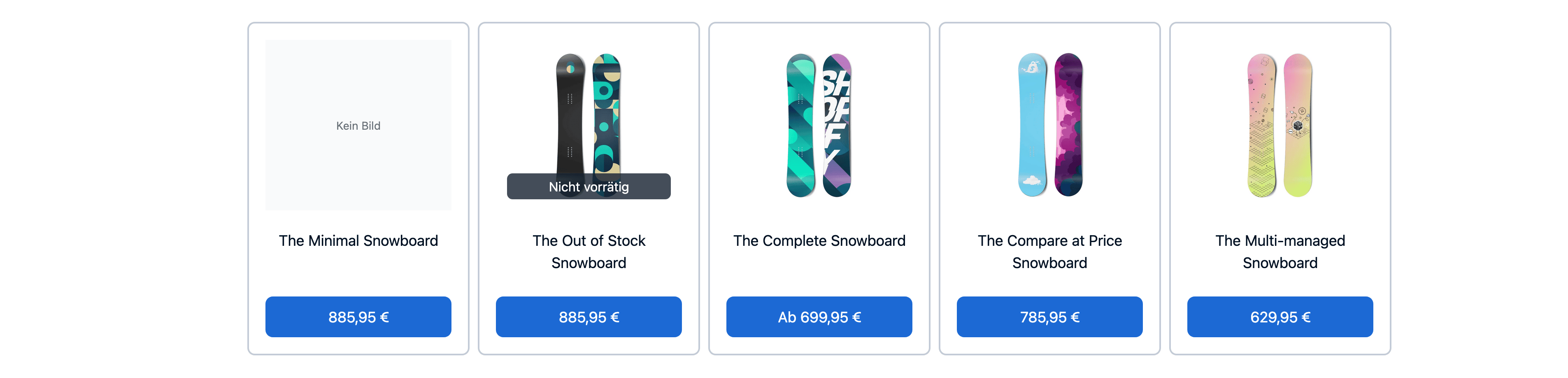
15remand height of22.5rem. These are Shopify-specific cards, not the vehicle archive card layout. - Each product shows its primary image, a title clamped to two lines, and its minimum variant price. Missing images show a translated placeholder; out-of-stock products show a translated stock label instead of being removed by the renderer.
- Prices use the current net/gross price-display context and the current locale’s number formatting. Products with multiple variants show the prefix
Abbefore the minimum price; that prefix is currently hardcoded. - Hovering a product enlarges its image and dims the other product cards. The funnel slide is unaffected.
imageObjectFitcontrols image fitting. The first slide’s product image may receive priority loading; if a funnel occupies the first slide, no product image receives that first-slide priority.- There are no previous/next arrow controls. Neither
crossSellEnablednor the formershowNavigationsetting controls navigation.
Current interaction limitation: the price is rendered inside a button, but that button has no click handler. The card has no product-detail link, variant selector, or add-to-cart action. Do not use the current banner as the only route to purchasing a product.
Loading, caching, and failures
Products and recommendations are resolved by the backend while preparing the banner. The frontend receives complete product data; it does not progressively fetch more recommendations while scrolling or show loading skeletons.
The Shopify recommendation query follows the banner fetch policy:
| Banner fetch policy | Shopify query policy |
|---|---|
cache-first | Cached |
cache-only | Cache only |
network-only | Network only |
no-cache | No cache |
| Other/default | Cached |
There is no banner-specific fixed cache lifetime documented by this implementation. Page delivery and revalidation also affect when visitors see refreshed banner data; see Caching.
If recommendation mode has no seed, the recommendation list stays empty. Recommendation lookup errors and local product-loading errors are logged and produce an empty product list. The implementation does not fall back to the manual selections. Funnel content can still keep the banner visible. Normal banner activation and draft-preview rules apply.
Examples
CMS product selection
Select actual synced products in the CMS. The following illustrates the identifier payload; replace the sample ids with ids from your store.
[
  { "productId": "gid://shopify/Product/1234567890" },
  { "productId": "gid://shopify/Product/1234567891" }
]
With upsellRecommendationMode=false, both products are displayed in that order if they resolve. With upsellRecommendationMode=true, only the first id is used as the seed and Shopify’s recommendations replace the selected list.
Rendered banner
This example accepts an actual resolved product, so it produces a non-empty manual banner rather than an empty placeholder. CMS selections are normally resolved into this shape by the backend.
function createManualUpsell(
  product: Shopify.Storefront.Product
): UpsellBlockBanner {
  return {
    typename: BannerTypename.UpsellBlock,
    id: 'b_123',
    title: 'Mehr für dich',
    titleTag: 'h2',
    titleAlign: 'left',
    cssId: null,
    cssClasses: null,
    imageObjectFit: 'contain',
    products: [product],
    funnelBanners: [],
    crossSellEnabled: false,
    recommendationMode: false,
    recommendationLimit: 10
  };
}
Troubleshooting
| Symptom | Check |
|---|---|
| Banner is missing | Activation rules; whether both products and funnel banners resolved to empty arrays |
| Selected products are missing | Product identifiers and local Shopify sync availability |
| Manual list exceeds the limit | Expected: the limit applies only in recommendation mode |
| Recommendations are empty | First valid seed selection, Shopify availability, backend logs, and local sync |
| Recommendations are fewer than the limit | Shopify may return fewer ids; unresolved local products are omitted; no backfill is performed |
| Additional selected products do not appear | In recommendation mode, only the first selection is used as a seed |
| Funnel is missing or out of order | Nested banner validity and managed firstBannersOrder |
| Cross-sell toggle changes nothing | Expected for Shopify; it currently affects vehicle source mixing only |
| Price button does nothing | Current renderer has no purchase or navigation handler |
| Changes are not visible immediately | Banner fetch policy, product sync, and page caching/revalidation |